Cloud365 Exchange For Business is our own hosted Exchange email platform — built, owned and operated by Cloud365 on Australian infrastructure. It's email that just works: add your account to Outlook, your iPhone or your Android with your address and password, and mail, calendar, contacts and the company address book sync automatically.
Because we own the platform, your email data stays in Australian data centres, administered by our Australian-based team. We don't scan your email to sell advertising and we don't route your communications through overseas servers. Integrated spam filtering, daily backups and 24/7 engineer support are included with every mailbox — not bolt-on extras.
Simple per-mailbox pricing
Three mailbox sizes, one flat price per mailbox per month. Every plan includes the full feature set — spam filtering, backups, portals, migration and 24/7 support. No per-feature add-ons, no licensing maze.
How Exchange For Business compares
The big platforms weren't built for Australian businesses that want their data local and their support direct. Here's how Cloud365 Exchange For Business stacks up.
| Cloud365 Exchange For Business | Microsoft 365 | Google Workspace | |
|---|---|---|---|
| Data location | Australian data centres, Cloud365-owned | Global Microsoft cloud | Global Google cloud |
| Support | 24/7 from real engineers — no bots, no offshore queue | Tiered support / chatbots | Tiered support / chatbots |
| Pricing | Flat per mailbox, from $10/month | Per-user licence tiers | Per-user licence tiers |
| Native Outlook & mobile | Yes — Outlook, iPhone & Android via ActiveSync | Yes | Partial / via sync tools |
| Daily backups + restore | Included, with engineer-assisted restore | Add-on / limited retention | Add-on / limited retention |
| Setup & migration | A real engineer sets up your domain & migrates mailboxes | Self-serve or paid partner | Self-serve or paid partner |
Switching is handled for you
A real engineer sets up your domain, migrates your existing mailboxes and configures every DNS record — MX, SPF, DKIM, DMARC and Autodiscover — so you go live cleanly. When you need us afterwards, the same team replies with something specific and useful.
How mailbox migration works
If you'd like help bringing your existing email and calendar data across, there are two simple ways to do it — pick whichever suits the size of your move. Either way, nothing is left behind.
Self-service with PST files
Back up or export your existing mailboxes to PST files, then import them straight into your new Cloud365 Exchange For Business mailbox. Ideal for a handful of mailboxes where you'd prefer to handle the transfer yourself, in your own time.
Hand the PST files to us
Got multiple mailboxes or large data sets? Export your mailboxes to PST files and send them to us — we import them at our end. The migration is seamless for your team: each person's existing email and calendar data simply appears in their new mailbox automatically, ready to pick up right where they left off.
Spam filtering on Cloud365 Exchange For Business isn't a bolt-on product — it's filtering built directly into the platform, which makes it far more powerful than a standalone gateway sitting in front of someone else's email. Because we run the mail platform and the filtering together, suspect mail is held safely in quarantine and never silently deleted, and policy travels with the mailbox.
Filtering works on both inbound mail — protecting your staff from spam, phishing, malware and business email compromise — and outbound mail, keeping your domain's reputation clean so legitimate email reaches inboxes. Every user gets a daily quarantine digest and self-service control over their own lists.
Applications that send email — order confirmations, notifications, system alerts, backup reports — need a reliable outbound path. Sending directly from a server is unreliable: IP reputation, SPF records and blacklisting all affect deliverability. A properly configured mail relay ensures your application's email actually reaches recipients.
Cloud365 provides managed mail relay as part of every managed service — your hosted application sends through our relay infrastructure, which is properly configured with SPF, DKIM, DMARC authentication, IP reputation management and delivery monitoring. If your application's email isn't reaching recipients, we investigate it.
Every Cloud365 mail relay customer can receive automated delivery reports on a daily, weekly or monthly schedule — emailed directly to nominated recipients. Reports show delivery statistics, daily summaries and a full message log so you can see exactly what your applications are sending and confirm it's arriving. The format and frequency can be tailored to suit your team's requirements.
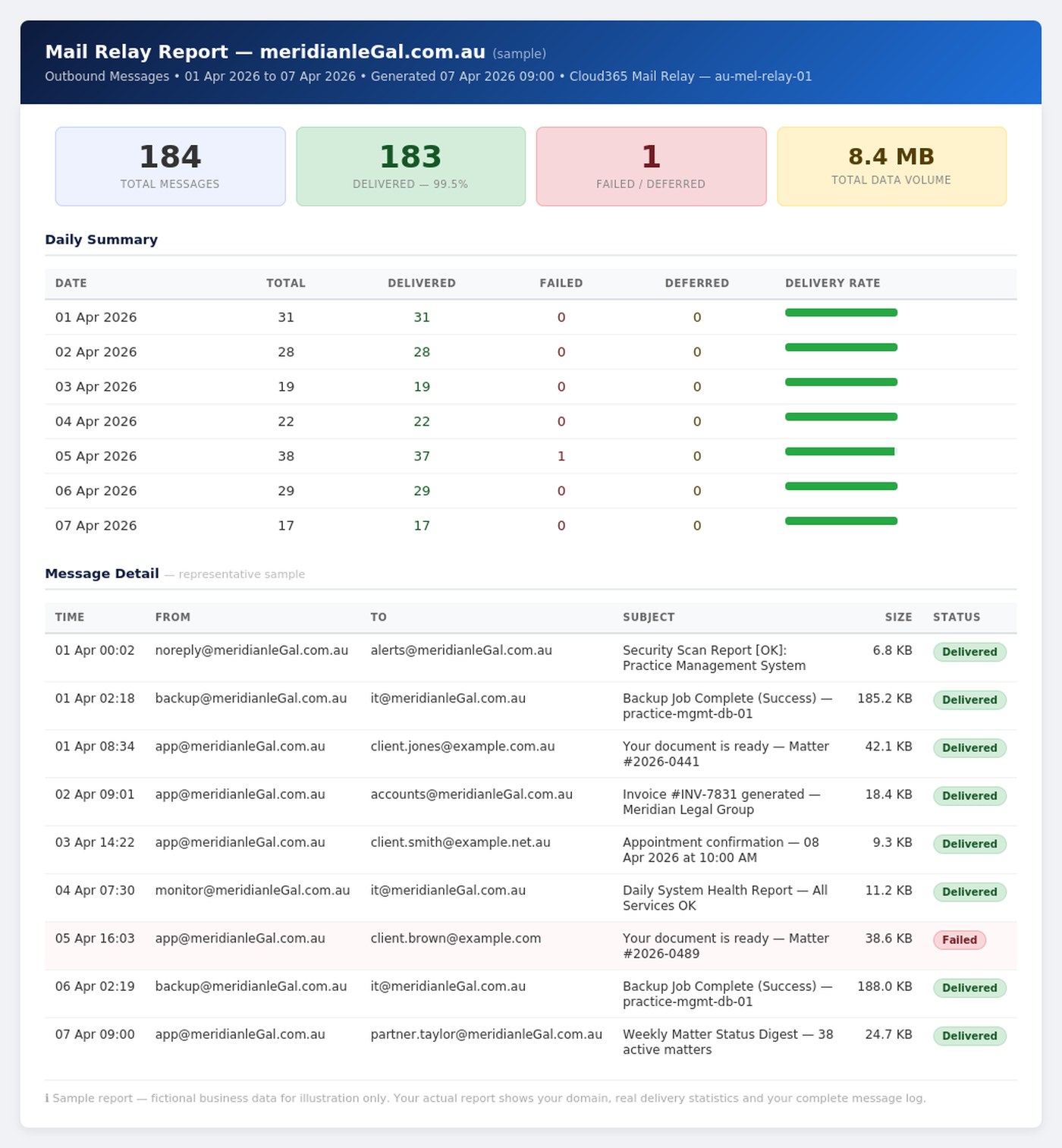
ℹ️ Sample report using fictional business data. Your actual report will show your domain, real delivery statistics and your complete message log for the relay period.